
Telehealth teams lose hours re-typing orders between systems. Check what is ready to connect.
One record, entered once, checked at every handover.
A free self-check for online prescription, consultation and insurance teams: which systems can connect and what each vendor must give you. You fill it in alone. Then a 30-minute call.
Get the integration-readiness checklistOr book a 30-minute callor write to [email protected]
Page updated October 19, 2026.
On this page
What does a telehealth integration connect?
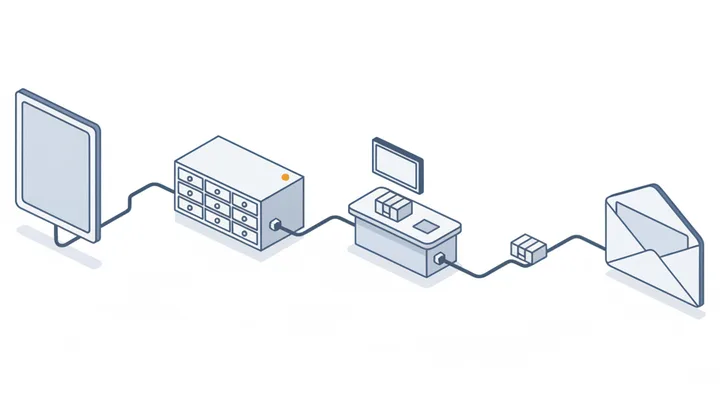
It connects the systems an order passes through, so each fact is entered once: the intake form, your CRM, the pharmacy or carrier API, and the follow-up emails.
For the intake side, read how patient intake forms connect to a healthcare CRM. To follow one order through every stop, see the worked order example.
- Intake form A person fills in your intake or order form, which checks the required fields before anything is saved.
- CRM The CRM receives the record and matches it to an existing contact, so a returning person is updated, not duplicated.
- Pharmacy or carrier API The order or enrollment is sent to the pharmacy or insurance-carrier API from the CRM record, with no copying between screens.
- Follow-up email and status Status changes from that API come back to the CRM and trigger the follow-up email your team has approved.
Where do telehealth orders get stuck?
At a handover between two systems, where a person copies data by hand or a status never travels back. Here is what one order's handovers look like when they are connected.
- 08:02:11intakeOrder T-0417 received, required fields presentok
- 08:02:12crmContact matched on email, record updated, no duplicateok
- 08:02:14pharmacyOrder sent by API, acceptedok
- 13:47:30pharmacyStatus changed to dispatched, tracking number receivedok
- 13:47:31emailShipment email sent from your own email serviceok
- 02:00:00portalScheduled enrollment sync, one record rejected: policy number missingalert sent to operationsfailed
What used to go wrong at these lines
- Lines 1 and 2Orders re-typed from the form into the CRMWe connect the form to the CRM so each submission creates or updates a record without anyone copying it.
- Lines 4 and 5Pharmacy status not reaching the customer's emailWe read status changes from the pharmacy API and send the matching email from your own email service.
- Line 2Duplicate contacts when someone re-ordersWe match each new order to an existing contact on a stable key such as the email address, so a repeat order updates the record.
- Line 6Nightly portal data that never reaches the CRMWe schedule or trigger a sync from the portal to the CRM, and raise an alert when a run fails.
What do you touch, and what do you never touch?
We work on your integrations, inside accounts you own. We never hold patient data on our own systems, and we make no clinical decisions.
If your records also live in an EHR, the EHR integration guide lists what to ask that vendor. Where patient data is involved, see what your CRM vendors must sign.
We never
- Store patient data on our own systems
- Make clinical decisions or change treatment rules
- Certify HIPAA or any other compliance
- Connect a vendor that has not signed the BAA your setup requires
- Ask for patient information through this website
We work on
- Your forms
- CRM workflows and fields
- API connections between your vendors
- Email templates and triggers
- Monitoring of the syncs
How does an integration project run?
In four steps: a self-check you do alone, a free call, access only after we have signed your NDA, and a handover where you revoke that access.
- Self-check
- You go through the readiness checklist on your own. Nothing is submitted, and we see none of it.
- Call
- A free 30-minute call about your answers, then a written map of your systems and the places where records are re-typed.
- Access
- Access starts only once we have signed your NDA, or you have signed ours. You create least-privilege credentials in your own accounts, and we build with test records first.
- Handover
- Documentation, alerts when a sync fails, and you revoke our access. We keep no copies of your data.

Have you built this for a real prescription business?
Yes, for an online prescription provider: the order flow, treatment-specific emails and shipment updates. We do not publish the client's name or numbers.
- What we connected
- Storefront orders to a pharmacy API, treatment-specific emails, shipment tracking updates, and groundwork for a patient portal.
- How we worked
- Test records first, access only inside the client's own accounts.
What do operations leads ask before a call?
Eight questions teams ask before a first call, answered briefly.
Can you connect a pharmacy API to our CRM?
Usually yes, if the pharmacy offers an API and gives you a test environment. We map your order fields to theirs, build the connection in the test environment first, and add an alert for failed requests. If the pharmacy has no API, we say so on the call and look at what it does offer, such as a scheduled file.
Can GoHighLevel be used with HIPAA data?
It depends on your plan and on whether HighLevel signs a BAA with you. Get that in writing before any patient data goes in. We do not certify it, and we do not certify HIPAA compliance for any tool.
Do you need access to patient records?
No for the self-check or the call. During the build we use test records. Production access comes only after we have signed your NDA, is limited to what the integration needs and stays in your accounts.
When do you get access to our systems?
Only after the call, and only once we have signed your NDA or you have signed ours. You create the credentials in your own accounts, limited to what the integration needs, and you revoke them at handover. We keep no copies.
Do you sign a BAA?
Whether one is needed depends on the access the work requires. We settle it in writing before any work that touches patient data.
Can you sync an insurance enrollment portal into our CRM?
Often yes, when the portal offers an API, an export or a scheduled file. We build a nightly or event-driven sync into the CRM, match records to existing contacts, and alert you when a run fails. What is possible depends on what the portal exposes.
What does the 30-minute call cover?
Your answers from the readiness checklist if you have them: which systems you use, where records are re-typed, what access each vendor offers, and whether a BAA is part of your setup. You leave with a plain next step. If we build, the price is quoted after the call.
What should we check before a telehealth integration?
Whether each system has an API and a test environment, who can create limited credentials, whether a BAA is in place with every vendor that stores patient data, and where staff re-type records today. The free readiness checklist walks through it.
What do we need to book the call?
Your name, a work email and what kind of business you run. No patient information.
Please do not send patient information. This form has no message field on purpose.